VOID AUDIO / THE BROWSER-LOCAL MASTERING STUDIO
Your sound.
Finished.
Your mix deserves a strong finish.
Master, compare and export in your browser.
Your audio never leaves your device.
EARLY ACCESS.
ONE COMPLIMENTARY GUEST MASTER.
LOCAL PROCESSING YOUR ORIGINAL, INTACT LISTEN. COMPARE. REFINE. MADE FOR YOUR EARS
01 / INSIDE THE STUDIO
Less friction.
More feeling.
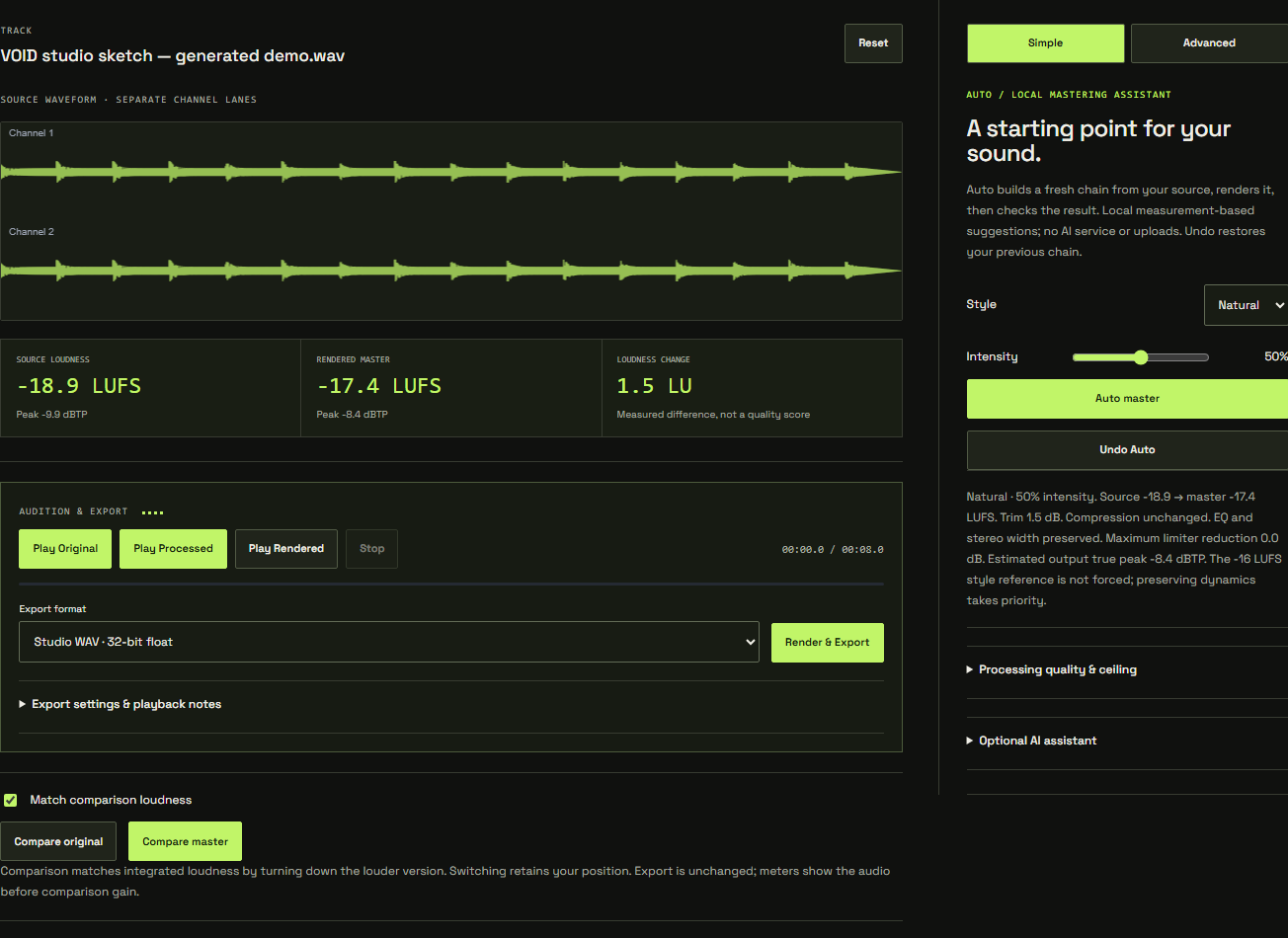
A clear view of your track. A chain you can shape.
Go from first listen to final export without
leaving your browser.
THE SIGNAL CHAIN / SIX TOOLS. YOUR SIGNATURE.
Every move.
Unmistakably yours.
Start with a measured suggestion. Stay for the details. Every module can be adjusted, bypassed and reordered. Open an instrument to see what it does.
01 / TRIMFind your headroom.
Set the level entering the chain. A clean gain stage from −24 to +24 dB lets you work deliberately with the processors that follow.
02 / EQShape the balance.
Low and high shelves plus a focused mid band. Make small tonal moves, compare, and keep what serves your track.
03 / DYNAMICSKeep the movement.
Control peaks with threshold, ratio, knee, attack and release. Bypass it when the track already has the dynamics you want.
04 / WIDTHSet the space.
Mid/side control for mono and stereo tracks. Widen with care, and use the correlation meter and stereo scope to check the result.
05 / CLIPChoose your edge.
Add intentional clipping with drive and a sample ceiling. Studio quality uses 4× oversampling around the clipper to reduce aliasing.
06 / LIMITControl the peaks.
A linked lookahead sample-peak limiter. Enable the separate render ceiling check when you want estimated true-peak measurement and whole-render attenuation.
02 / FROM MIX TO MASTER
Four moves.
A world of difference.
01
Bring your track.
Drop in a finished WAV. See its waveform, loudness and peaks. Your original stays untouched.
02
Find the feeling.
Start with local Auto or shape the chain yourself. Trim, EQ, dynamics, width, clip and limit.
03
Trust your ears.
Compare your original and rendered master at matched loudness. Refine until it feels right.
04
Take it out.
Export a floating-point or PCM WAV, or a 320 kbps MP3 for sharing. Your next move is yours.
03 / CLOSE TO THE SOURCE
Your audio.
Your machine.
Your call.
The processing happens on your device. No audio uploads, no cloud render queue. Import, measure, process and export locally.
Optional administrator-enabled AI can suggest settings from disclosed measurements and context, with your consent. It never receives your audio and has not listened to your track. Local Auto works independently.
BUILT FOR FINISHED TRACKS. SHAPED BY YOU.
BEFORE YOU PRESS PLAY
Good questions.
Straight answers.
What is VOID Audio?
VOID Audio is an online mastering tool that runs its audio processing in your browser. Import a finished WAV, use local Auto or the editable processing chain, compare at matched loudness, and export WAV or MP3.
Can I try one master without an account?
Yes. Early Access includes one complimentary guest master in the browser. After a successful export, that browser is asked to sign in. Invited testers get unlimited local mastering during the testing period. Your audio is processed locally on your device by default.
Does the AI listen to my music?
No. Optional AI is currently administrator-only. With explicit consent, it receives disclosed measurements, context and your direction, never the audio. Local Auto is a separate, measurement-based tool and needs no AI connection.
Will it make my track louder?
Processing can change loudness, but a louder track is not automatically a better one. VOID measures the result and offers matched-loudness comparison so you can judge the sound. Auto does not force every track to the same target.
What can I import and export?
VOID supports compatible WAV files subject to available browser memory. Large or high-resolution files require more memory and may be safely refused on lower-memory devices. Export 32-bit float, 24-bit or 16-bit PCM WAV, or 320 kbps MP3. MP3 supports mono/stereo at 32, 44.1 and 48 kHz. Other rates can be exported as WAV.
Is my audio stored online?
No. Your audio stays in browser memory during the session. Download your export and keep your source file. Save Chain downloads settings only; it is not an audio backup.
THE NEXT THING WE WANT TO HEAR IS YOU.
Make it hit home.
YOUR NEXT SESSION / PICK UP WHERE YOU LEFT OFF
Keep the decisions. Keep your audio.
Private projects save your processing settings, named versions and presets. Bring the original WAV when you return. Your track stays on your device.
THE FIELD GUIDE / FROM FIRST IMPORT TO FINAL EXPORT
Know what you’re hearing.
Practical walkthroughs, real studio screenshots and clear explanations of the tools. Learn a technique, then put it to work.